.png?width=200&height=40&name=matecat-logos_Tavola%20disegno%201%20copia%20(1).png)
What is Intento?
Intento is a user-friendly API that allows you to access third-party AI models from various vendors. The performance of these models can vary greatly depending on how well their training data aligns with your specific needs. Since there can be a significant difference in price between these models, choosing the wrong one could result in a complete miss. Intento helps you find, evaluate, and utilize the right models in a way that is unbiased towards any particular vendor.
How to enable Intento
To enable Intento on Matecat, open the Machine Translation tab in the project settings panel and select Intento as your MT provider from Add MT Engine.
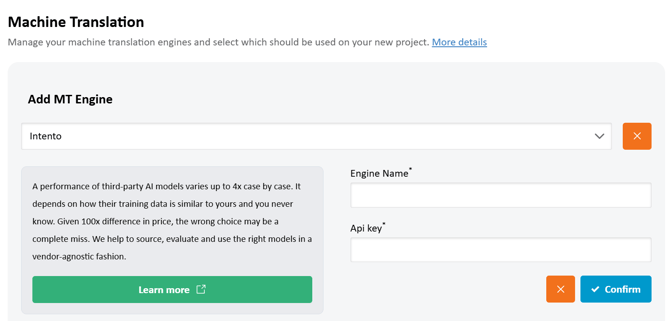
You will need to enter a name for the engine and your Intento API key, then click on Confirm to create the engine.
Available options
Once Intento is activated, click the Options button at the bottom of the panel to access its settings.
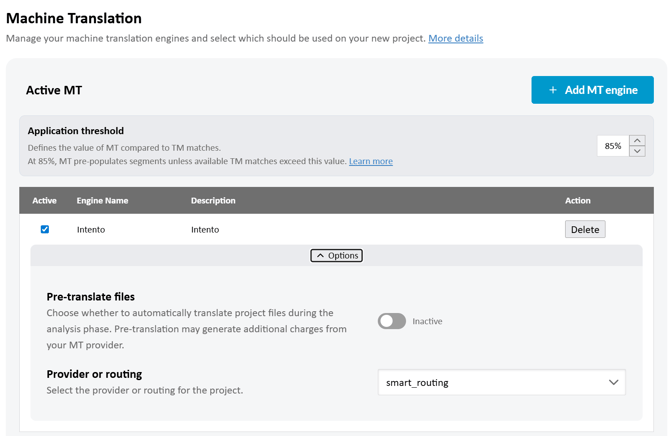
In this section, you can set the following options:
-
Pre‑translate files: this option is disabled by default. When enabled, Matecat will automatically pre-translate project files during the analysis phase. Keep in mind that pre-translation may generate additional charges from the MT provider.
- Provider or routing: this setting lets you choose how Intento should handle MT requests for the project. You can either select a specific provider (such as Google Translate, DeepL, or ModernMT) or use one of the available routings. When using a routing, Intento automatically decides which provider to use based on performance, cost, or your predefined preferences.